PlantFlow 3DSimulatorGuidesDownloadAboutContactEnglishالعربيةاردو

Learn electrical wiring and automation by doing, free

PlantFlow 3D is a free online simulator for electrical, instrumentation and industrial automation. Wire a motor starter yourself, watch the real current flow on every numbered wire, measure with a virtual multimeter and find hidden faults like a technician.

✔ 100% free✔ No login✔ Works on phones✔ English · العربية · اردو✔ Offline app

▶ Start the simulator Try your first motor circuit ⬇ Download app (Windows, Mac, Android)
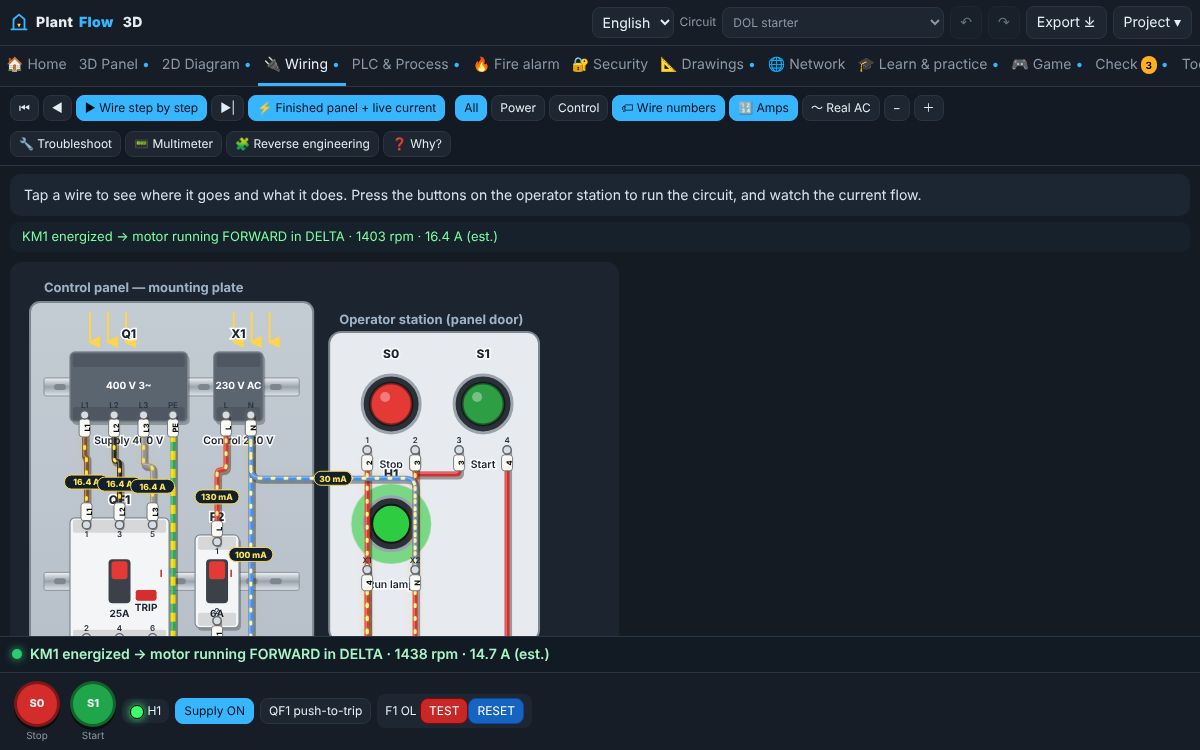
Control panel wiring view with live current flow and numbered wire tags
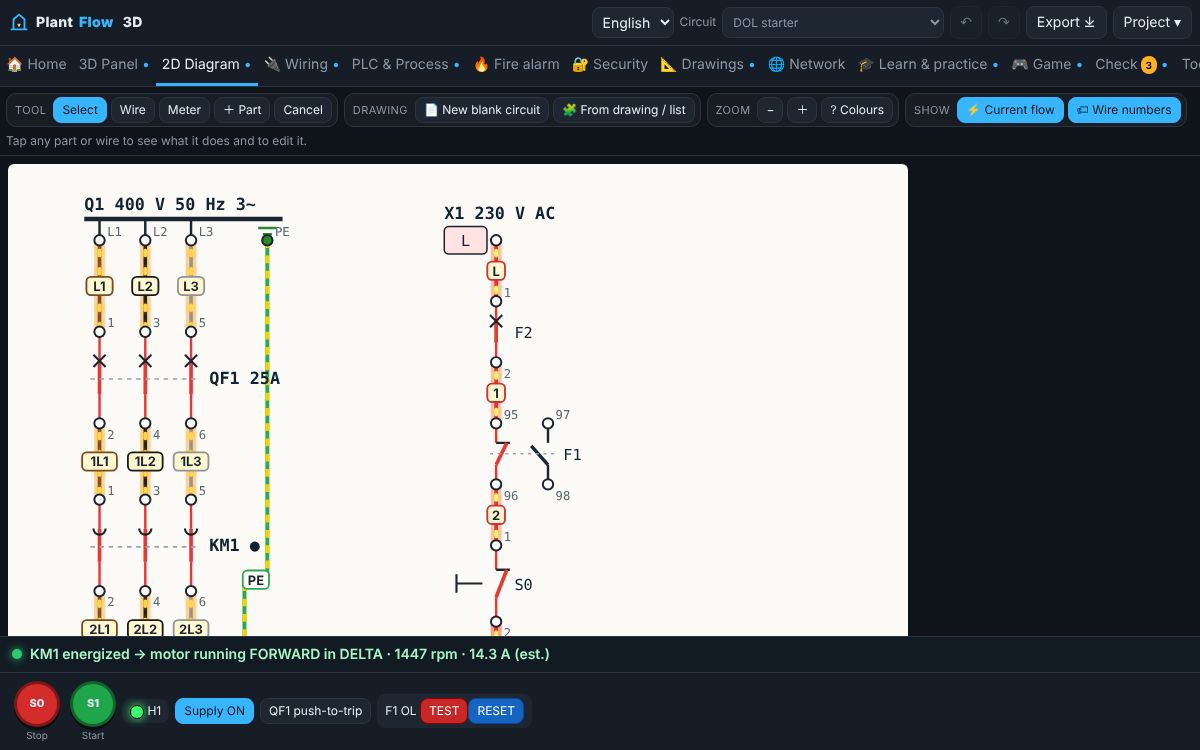
DOL motor starter 2D schematic with wire numbers
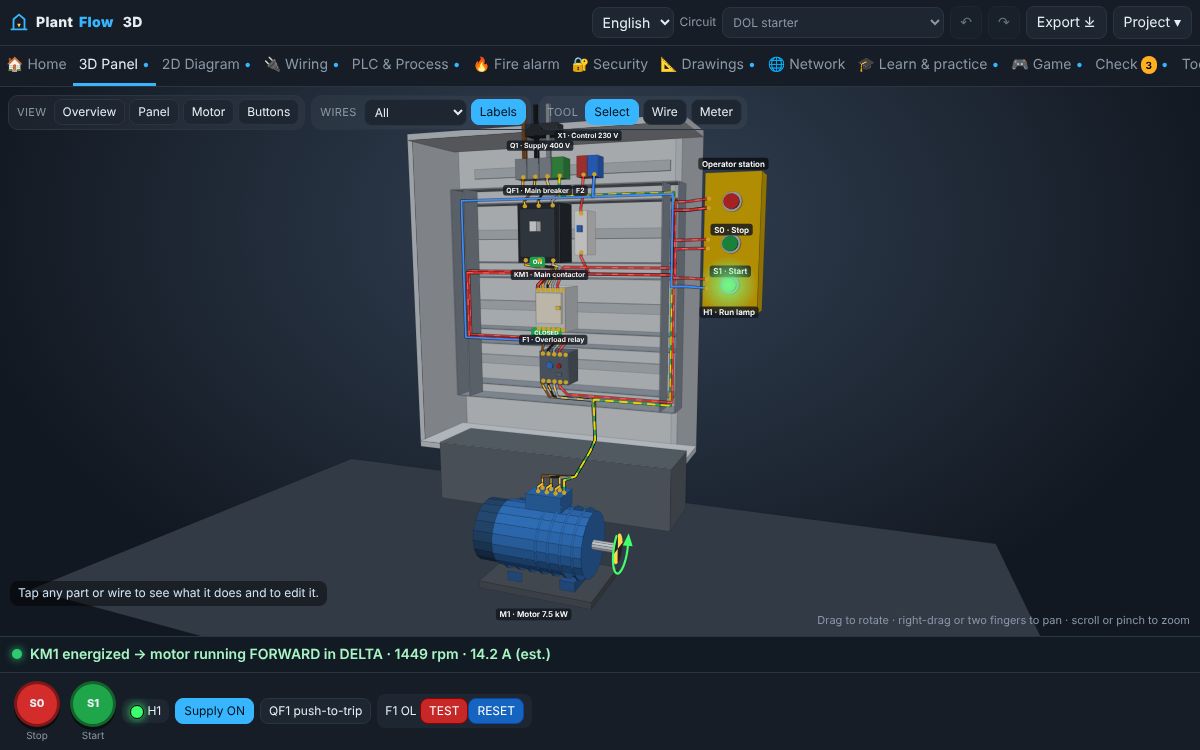
3D control panel and motor simulator
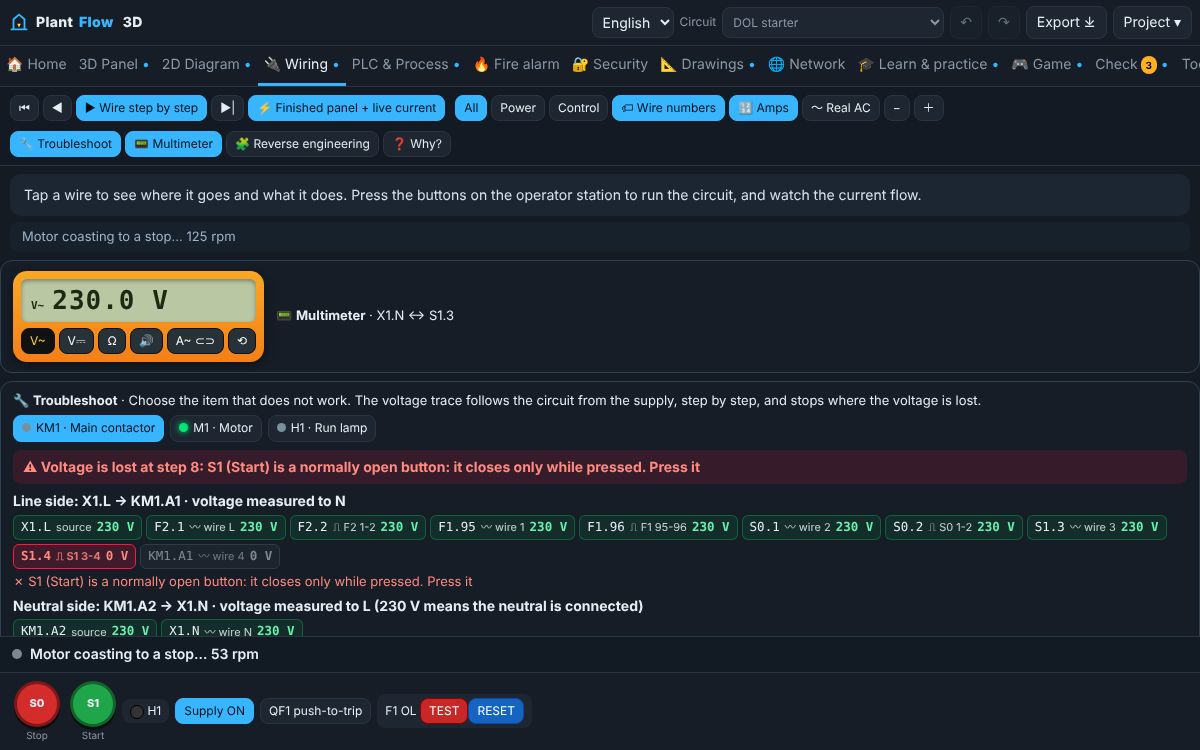
Virtual multimeter and voltage trace troubleshooting

What you can do

Wire it yourself

Connect the DOL starter terminal by terminal. Wrong connections are explained at once, including short circuits between phases.

See the real current

Animated current flow and live amps on every wire, numbered like a real panel. Switch to the AC view to see the three phases 120° apart.

Virtual multimeter

Measure AC and DC voltage, resistance and continuity with a buzzer, and current with a clamp meter. A LIVE warning teaches safe isolation.

Find the fault

A voltage trace follows the circuit from the supply and stops where the voltage is lost: open contact, broken wire, tripped overload or open coil.

Reverse engineering

Rebuild an existing panel from an Excel wire list, a typed panel survey or a photo of a drawing, then simulate and troubleshoot it.

2D, 3D, PLC and more

Star-delta, forward-reverse, VFD, soft starter, distribution boards with RCDs, lighting, PLC ladder, 4–20 mA loops, fire alarm, P&ID and networks.

Learning paths for every level

Students

Start from zero: voltage, current, symbols, colours, safe isolation and your first DOL starter, step by step with quizzes.

Technicians

Hands-on practice: star-delta, meters, clamp current, overload TEST and RESET, and real fault finding.

Engineers

Design and analyse: load schedules, cable checks, protection, P&ID, loop drawings, PLC I/O and Excel reports.

Practical lessons

  1. Electricity basics and safe isolation
  2. DOL motor starter: learn by doing
  3. Star–delta starter in practice
  4. Fault-finding: three real faults
  5. Engineer: design and documents

Free guides

How a DOL motor starter worksThe direct-on-line starter explained step by step: power circuit, control circuit, seal-in contact, stop button and overload protection.Star–delta starting explainedWhy star–delta starting reduces starting current, how the three contactors and the timer work, and the interlocks that keep it safe.Forward–reverse motor control and interlocksHow swapping two phases reverses a three-phase motor, and the electrical and push-button interlocks that prevent a phase-to-phase short.Motor full-load current and overload settingsHow to calculate a three-phase motor's full-load current, why the nameplate value wins, and how it is used for overload and cable checks.4–20 mA current loops for beginnersWhy industry sends measurements as 4–20 mA, how a 2-wire loop is powered, how to convert mA to engineering units and how NAMUR NE 43 signals faults.PLC ladder logic basicsContacts, coils, latches, timers and counters explained with a real pump control program, and how a PLC scan works.Conventional fire alarm zones and EOL supervisionHow a conventional fire alarm panel detects alarms and cable faults using an end-of-line resistor, and what silence, reset and disable do.Access control: fail-safe and fail-secure locksHow an access controller decides to open a door, the difference between fail-safe and fail-secure locks, and why fire release matters.Reading P&ID instrument tagsHow instrument tag letters describe what is measured and what the device does, with examples like LT, LSHH, PDT and FIC.Instrument loop diagrams and cable screensWhat an instrument loop diagram shows, how a 2-wire loop is wired from field to PLC, and why cable screens are earthed at one end only.Industrial network basics: VLANs, PoE and cable limitsHow plant networks separate control, CCTV and access control with VLANs and a firewall, and the practical limits of copper, fibre and PoE.Variable frequency drives (VFD) explainedHow a VFD controls motor speed, why it starts without inrush current, how its 24 V control inputs work and what to check when it trips.Soft starters: gentle starting for big motorsHow a soft starter limits starting current and mechanical shock by ramping the motor voltage, and how it differs from a VFD.Single-phase capacitor motorsWhy a single-phase motor needs a capacitor, how to reverse it, and how to find a failed capacitor.Automatic transfer switches (ATS) for standby generatorsHow an ATS moves an essential load from the mains to a standby generator and back, and why the two sources must never be connected together.Power factor and capacitor banksWhat power factor means, why motors lower it, and how an automatic capacitor bank brings it back up and reduces the line current.Two-speed Dahlander motorsHow one tapped winding gives two speeds, why a third contactor makes a double star, and why two phases are swapped for high speed.Lighting control with a photocell and a HAND–0–AUTO switchHow outdoor and street lighting is switched automatically by a photocell through a lighting contactor, with a selector for maintenance.Three-phase distribution boards, MCBs and RCDsHow a 400/230 V board feeds single-phase final circuits from three phases, why the neutral current depends on balance, and how MCBs and RCDs protect people and cables.Overload relay contacts 95-96 and 97-98: test, reset and settingWhat the overload relay terminals 95-96 and 97-98 do, how to use the TEST and RESET buttons, manual and automatic reset, and how to set the current dial.How to use a multimeter: voltage, continuity and resistanceA practical guide to measuring AC voltage, testing continuity with the buzzer, reading coil and winding resistance, and using a clamp meter safely in control panels.Troubleshooting a motor control circuit step by stepA safe and logical method to find why a motor does not start or stops: symptoms, visual checks, the voltage trace, and dead testing.Emergency stop circuits: how an E-stop should be wiredHow emergency stop buttons work, why they use normally closed latching contacts, where to wire them, and why releasing an E-stop must not restart a machine.Contactor terminals explained: 1-2, 3-4, 5-6, A1-A2, 13-14 and 21-22How to read contactor terminal numbers, which contacts carry motor current, how the coil is connected, and how auxiliary contacts are used for hold-in and interlocks.Electrical wire colours and wire numbering in control panelsIEC conductor colours for three-phase and control circuits, how wire numbers and ferrules work, and why the same number means the same potential.

All guides →

Frequently asked questions

Is PlantFlow 3D really free?

Yes. Every simulator, lesson, game, exam, drawing tool and certificate is free, with no account. The website is supported by ads.

Does it work on a phone?

Yes. It runs in any modern browser on Android, iPhone and computers, opens in a readable 2D view on phones, and can be installed as an app that works offline.

Which languages are supported?

English, Arabic and Urdu, including right-to-left layout.

Who is it for?

DAE and engineering students, electricians, instrument and maintenance technicians, and fresh engineers who want to practise motor control, wiring, PLC and troubleshooting.

Can I use it in my class?

Yes. Teachers and training centres can use it freely. The practical lessons give scores and a certificate of completion.

Is a passed virtual check an approval of a real installation?

No. PlantFlow is an educational model. Real installations must follow local regulations, manufacturer instructions and the approval of a qualified person.

⚠ Educational model: passing a virtual check is not approval of a real installation, protection settings or commissioning.